You can create an order with duty-free pricing by heading to the customer page and selecting Edit. There will be a checkbox called Excise duty free pricing. Typically this is only needed for export orders, but you are free to use this feature for any customers that need it.

If checked, when creating orders for this customer, the price book's price for each product will automatically be reduced by the excise duty amount of the item. This will not apply to orders already created. There is a chance this will display with the Unit price rounded to 4 decimal places. This is intentional, allowing Breww to calculate and report as accurately as possible. If this was rounded first, there is a chance that if multiple products were on an order, this could equate to an incorrect order total.
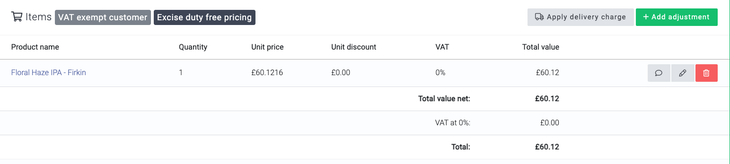
If your customer has a delivery address outside of your business address country, then tax will automatically be removed from the order. If your customer is tax-exempt but has a delivery address in the UK, you may want to review the Additional customer options guide on tax-exempt customers.