Supplier invoices in Breww allow you to record your inventory receipts' final invoiced quantities and pricing. With multi-currency support, supplier invoices can be recorded in the supplier's currency while automatically tracking base currency equivalents for reporting.
How to create a new supplier invoice
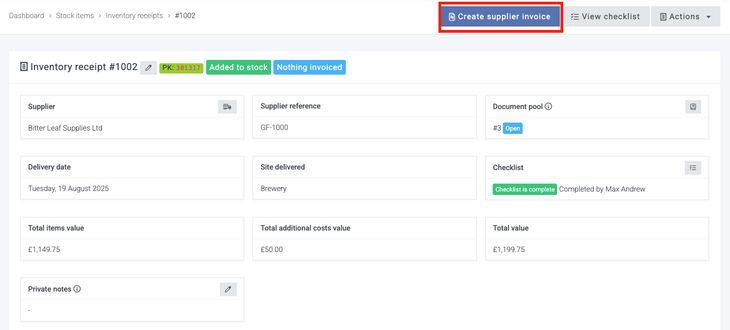
To create a new supplier invoice, simply go to an inventory receipt that the supplier invoice relates to and select Create supplier invoice.
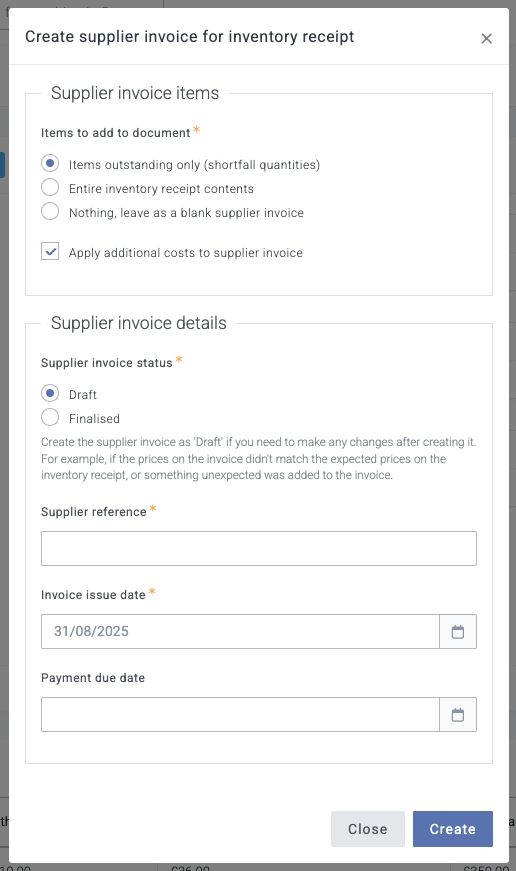
You'll then be presented with the option to automatically add to the supplier invoice the outstanding (non-invoiced) quantities on that inventory receipt, the entire inventory receipt contents, or create a blank supplier invoice. If the supplier has invoiced everything on the inventory receipt at the same prices, then simply choose Finalised as the Supplier invoice status and add the supplier reference to invoice the receipt fully and close it. If you have any changes to make to pricing, leave the Supplier invoice status as Draft, and you can then make changes to the supplier invoice once it is created.
Supplier reference
The Supplier reference field is where you enter the supplier's own invoice number or reference for the transaction — this is the number that appears on the invoice your supplier has sent you. Recording this makes it easy to match up Breww's records with your supplier's paperwork and is helpful when querying invoices with your supplier.
The supplier reference is required when creating a supplier invoice but is optional on purchase orders and inventory receipts. This is because the supplier invoice represents the actual bill from your supplier, and having their reference ensures accurate record-keeping and a smooth sync to your accountancy software.
Multi-currency supplier invoices
When working with international suppliers, supplier invoices will automatically use the currency configured for that supplier. The invoice will display:
- Original amounts in the supplier's currency
- Base currency equivalents using the exchange rate from the invoice date
- Total landed costs in both currencies
This ensures accurate cost tracking regardless of currency fluctuations.
How to spread a single supplier invoice across multiple inventory receipts
Supplier invoices will automatically allocate against all inventory receipts in the same document pool. So, to create a supplier invoice that covers multiple inventory receipts, you can create a new invoice as described above and then add the extra items covering the other inventory receipts to the new supplier invoice. The document pool will then handle reconciling what was invoiced across the multiple receipts in the same pool.
How supplier invoice prices affect your inventory receipt costs
The supplier invoice is the source of truth for all pricing in the document pool, as it represents the price actually charged by your supplier, and will override the prices set on any inventory receipt and the cost of any stock added through those receipts.
When a price or quantity is updated on your supplier invoice, Breww will calculate the new total landed cost for that item and distribute that across the same stock item on your related inventory receipts. If your supplier didn't invoice the full quantity of an item, for example, because some was provided for free, then your inventory receipt's price will show a lower price per quantity than the invoice, as the total price paid was actually spread over a greater quantity received than was invoiced.
For multi-currency invoices, the base currency equivalent is calculated at the time of the invoice and locked in, ensuring consistent cost basis for inventory valuation.
Uploading a supplier invoice to your accountancy software
If you have Sync supplier invoices enabled in your accountancy integration, Breww will upload the supplier invoice once it has been finalised. For multi-currency invoices, Breww will include both the original currency amounts and base currency equivalents as required by your accountancy software. After this point, Breww will no longer sync updates to that supplier invoice in your accountancy software, so any changes to quantities or prices in Breww will need to be manually replicated in your accountancy software.
How the supplier reference is used in your accountancy software
When a supplier invoice is synced, Breww combines the supplier reference with Breww's own internal reference to create the bill number in your accountancy software. For example, if your supplier reference is INV-2025-001 and Breww's internal reference is BRW-1234, the bill number will appear as INV-2025-001 (BRW-1234) in your accountancy platform.
Each accountancy platform has a character limit for this field (for example, 21 characters in QuickBooks Online, and 30 characters in Xero). If the combined reference exceeds the platform's limit, the supplier reference portion will be truncated to fit, while the Breww internal reference suffix is always preserved. To avoid truncation, it is best to keep your supplier references reasonably short.