Breww can quickly and accurately calculate alcohol excise duty for Australian producers. Whether you produce beer, spirits, brandy or other beverages, Breww handles the correct tariff and rate lookups automatically.
To run your report for a given period, click the Excise duty tab on the left-hand menu and enter the date range you'd like to report on.
Breww will then generate your excise duty totals, showing you the LALs (litres of alcohol) and excise amount owed per tariff. You'll also see a high-level breakdown showing the total quantity and volume of each drink, container type and ABV combination that became both payable and reclaimable during the period.
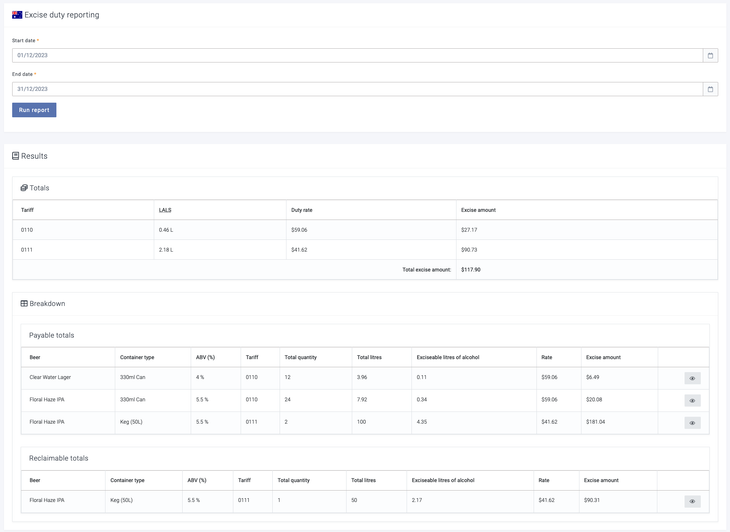
To view the breakdown in more detail, click the View entries button to the right of each breakdown row. Here, you can see all the entries that made up the totals seen in that row, ensuring your excise reporting is fully and easily auditable.

Setting up your drink types for Australian duty
When creating or editing a drink type under Settings -> Production settings -> General production settings, select Alcohol excise duty as the duty type. You will then be asked to choose a Duty sub-type from the following options:
-
Beer -- For all beer products. Beer receives a 1.15% ABV reduction when calculating exciseable litres of alcohol, and tariffs vary based on ABV and container size.
-
Spirits -- For spirits such as whisky, gin, rum, vodka and tequila.
-
Brandy -- For brandy products.
-
Other beverages -- For other alcoholic beverages such as RTD. If the ABV is 10% or below, a different tariff applies compared to above 10%.
The duty sub-type determines which ATO tariff schedule Breww uses when calculating excise duty. Once a drink type has been created, the duty type and sub-type cannot be changed.
How does Breww calculate these totals?
Breww will determine that a product has become duty-payable when it is either dispatched as part of a delivery that is not for export or it is moved to a Non-bonded location.
If a product is returned from a delivery, it will remain Duty-paid and so will not be added to your excise duty report next time it is dispatched. If duty-paid product is then marked as lost or spoiled, Breww will add it to the Reclaimable totals section of your excise duty report and remove the volume from the totals to pay.
How does Breww determine which products are part of which tariff?
The tariff assigned to a product depends on the duty sub-type of its drink type, along with the ABV and (for beer) the container size.
Beer tariffs
For beer, Breww looks at three factors:
-
ABV -- Whether the rounded ABV is 3% or below, between 3% and 3.5%, or above 3.5%.
-
Individual container capacity -- Whether the container's Gross capacity is less than 8 litres, between 8 and 48 litres (inclusive), or over 48 litres.
-
Pressurised gas or pump delivery system -- If the container type is set to Cask or Keg, Breww treats it as designed to connect to a pressurised gas delivery system or pump delivery system. This affects the tariff for containers between 8 and 48 litres.
Beer also benefits from a 1.15% ABV reduction when calculating exciseable litres of alcohol. For example, a beer at 5.0% ABV would have its duty calculated using an effective ABV of 3.85%.
Spirits tariffs
Spirits use a single flat tariff (tariff 3.10) regardless of ABV or container size.
Brandy tariffs
Brandy uses a single flat tariff (tariff 3.1) regardless of ABV or container size.
Other beverages tariffs
Other beverages use one of two tariffs based on ABV:
-
ABV of 10% or below -- Tariff 2
-
ABV above 10% -- Tariff 3.2
ABV source
For non-derived drinks, the ABV is taken from the batch. Depending on your settings, this will either be the drink's advertised ABV, the measured ABV of the batch (based on gravity readings), or a manually entered ABV. For derived drinks, the ABV on the drink record (i.e. the advertised ABV) is always used.
To choose which ABV source you'd like to use, go to Settings -> Beer duty settings and set your preferred option beneath Default ABV calculations.
Does Breww have the excise duty rates built in?
Yes! Breww has the ATO excise duty rates built in from August 2021 onwards and will always be kept up to date with the latest rates, so there is no need to enter your excise duty rates into Breww manually.