
Bulk updating data
This guide is exclusively for the updating of data, and should not be confused with our data importer. For an overview of how to import data in bulk, please see our Data import guide.
In Breww, you can bulk update your Customers, Leads and Product data. This is an extremely useful tool, which means you do not need to go into each individual customer account or product page if you need to apply a large number of changes.
The bulk updater can be found by heading to Settings->Data imports and updates. The updater tools are towards the bottom of the page. It is very important that you do not use the importer functions at the top of the screen if you would like to update data, as using these would instead create new data in Breww. The tools you will need are under Bulk update existing data.

Updating your Customers
The Customers updater will allow you to download a CSV file containing key information set against the customer and customer primary contact, such as the price book, tags, assigned salesperson, preferred contact days and times and custom fields. You can then simply amend the applicable data in the fields you need, such as changing customers from Price Book A to Price Book B or changing the salesperson assigned to another member of your team. Once you are happy, you can save the file.
The Preferred contact days column lists the days separated by commas, for example Tuesday, Thursday, and Preferred contact from and Preferred contact until hold the times. You can give a time on a 24 hour clock, such as 17:30, or as a 12 hour time with am or pm, such as 5:30pm; when both are set, the until time must be later than the from time. Leaving any of these three cells blank clears that value on the customer.
It is imperative that you do not re-format this file and instead just update the relevant data accordingly. Doing so could cause unexpected issues in your account.
If you then select Update existing: Customers, you will be able to upload your changes, which will update your customer accounts in Breww in bulk.

Updating your Products
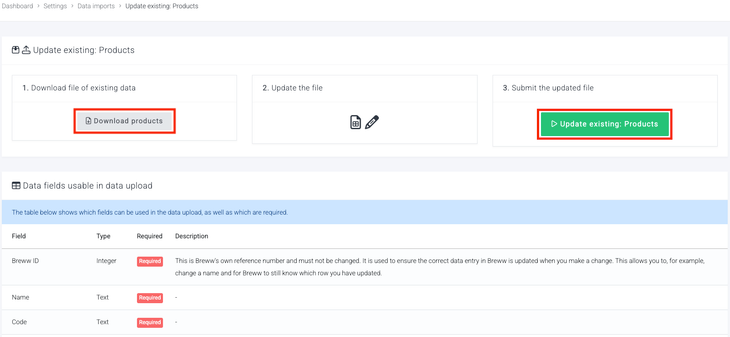
The same process can be carried out for your product data. Here, you will be able to bulk update key fields held against a product, such as Tags, codes/SKUs, and weights.
This feature also allows you to **obsolete products in bulk **and restore them.
It’s important to note:
-
Products cannot be fully deleted in bulk.
-
If a product has not been used, it can only be deleted individually from its product page.
-
If a product has been used, it cannot be fully deleted from Breww. This ensures historical data remains available for reporting.
Instead, products can be marked as obsolete. Obsoleted products can also be restored in bulk if needed in the future.
-

Updating your Leads
There is also a Leads updater, which works in exactly the same way as the Customers updater. Download the file of your existing leads, change the fields you need, and upload it again.
Things to know about all of the updaters
- Only the columns in your file are changed. The updater only touches the fields that were included in the file you uploaded, so anything you leave out keeps its current value in Breww.
- Lists of values are separated by commas. Columns that can hold more than one value from a list, such as Preferred contact days or a multiple choice custom field that allows more than one selection, are downloaded as the selected values separated by commas, and are uploaded the same way. Values are matched by name.
- The download is in your language. Values chosen from a list, such as day names and drop-down columns, are written in the language you use Breww in, and are matched in that same language when the file is uploaded. If you use Breww in a different language from a colleague, download and upload the file yourself rather than passing it between you.
- Don't edit the Breww ID column. Each row includes the Breww ID of the record it refers to, and that is how Breww knows what to update. If an ID has been changed, appears more than once, or refers to something that has since been deleted, the import will fail and tell you which IDs were the problem.
- Updates can't be undone. There is no undo button for an updater, so please check the file carefully before uploading it. Keeping the original download gives you a record of the previous values in case you need to put anything back.
- Keep an eye on the results. As with imports, the Recent data imports section at the bottom of the page shows the status of each update and lets you download the file again, including just the invalid rows if there were any.